The short version
- Start tiny: an 8 × 8 to 12 × 12 grid with 2 to 4 colors.
- Print the starter grids below, or draw your own on graph paper.
- When they're hooked, make a grid from their own photo.
What pixel art is
Pixel art is a picture made of little squares, like old video games. Each square gets one color. It's a good fit for kids because there's no "drawing it wrong." Every square is either done or not done yet, and the picture appears as you go.
Three starter grids to print
Each square has a number. Match it to the color key at the bottom, and leave the blank squares empty. Right-click or long-press an image to save it, then print.
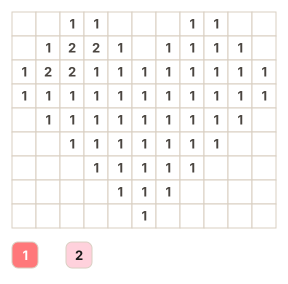 Heart11 × 9 · 2 colors · ages 5 and up
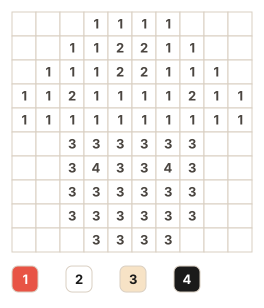 Mushroom10 × 10 · 4 colors · ages 6 and up
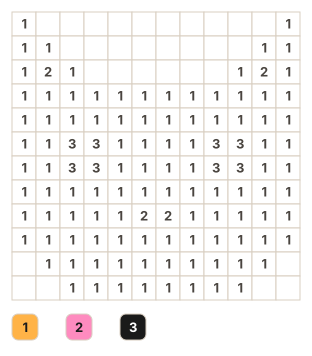 Cat face12 × 12 · 3 colors · ages 6 and up
More easy first projects
Draw these on graph paper with a pencil first, then color. A 1 cm grid is a comfortable size for small hands.
- Smiley face, 8 × 8. A yellow circle, two dark eyes, and a curved smile. Two colors.
- Rainbow, 12 × 6. Six stripes in arches. Great for practicing color order.
- Strawberry, 10 × 10. Red body, green leaves, and a few yellow seeds. Three colors.
- Their initial, 7 × 9. A big block letter in a favorite color, with a pattern behind it.
- A space invader, 11 × 8. One color on black. A favorite with kids who play games.
- The family pet, 16 × 16. Ready for a challenge? Start from a photo, below.
Start from your own photo
Kids care more about a picture of their own dog than a stock cartoon. Here's the easy way to make one:
- Open the photo to pixel art tool and pick a photo. It stays on your device.
- Set the grid to 24 squares and the colors to 6 for a first try.
- Switch to Color by number, download the PNG, and print it.
On iPhone or iPad, Color Cafe does the same thing with the camera, and your kid colors it in on screen.
Tips that keep it fun
- Color one number at a time. Finishing a color feels like a small win.
- Let them swap colors. A purple cat is still a great cat.
- Stop before they're tired. Pixel art keeps, and tomorrow's 10 minutes is fine.
- Hang it up. A finished grid on the fridge says "you made this."